

















Events concentrate large numbers of people into a temporary environment where schedules, room assignments, exhibitors, sponsors, and service information can change quickly. Digital kiosks can provide flexible information, but the right solution depends on attendee tasks, venue layout, visibility, stability, setup conditions, power and network access, and how the equipment will be transported and deployed.
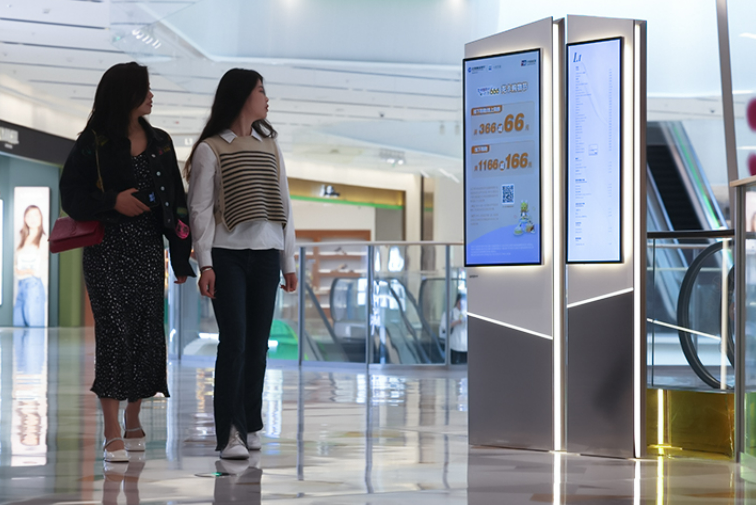
Rather than ordering one uniform fleet, event organizers can assign different kiosk, totem, or poster formats to registration areas, entrances, exhibition halls, major intersections, and sponsor touchpoints according to how attendees actually move through the venue.
Matching Kiosk Functions to the Event Attendee Journey
Events create temporary, high-traffic information needs, so digital kiosks should be selected around the attendee journey rather than around a standard equipment list. Entrance units may present check-in instructions, venue maps, schedules, QR information, or service directions. During the event, digital kiosks or poster displays can show room assignments, session times, sponsor messages, and other information that may change without replacing the physical display.
Large trade shows and conferences may also need interactive search for booths, halls, sessions, or amenities. Smaller venues may only need a simple map plus non-touch information. The role of digital kiosks for events is therefore to match the interface and hardware to the complexity of the attendee task rather than make every information point interactive.
Choosing the Right Hardware Format for the Venue
A floor-standing kiosk, digital totem, or poster display can serve different parts of the same venue. Procurement should consider entrance width, corridor space, viewing distance, branding needs, whether the unit needs to be repositioned, and how attendees move through the site. High-volume arrival zones may benefit from instantly readable non-touch information, while exhibition halls with hundreds of destinations can justify interactive search.
Temporary deployment also introduces practical constraints. Floor stability, anti-tip design, cable routing, nearby power, network availability, screen visibility under venue lighting, and service access during show hours all affect the final product choice. These physical details can be more important to event operations than the number of software features available.
Planning Procurement, Transport, and Local Event Setup
Quantity and placement should be planned from the venue map. Entrance points, registration areas, major intersections, session rooms, exhibition halls, and sponsor touchpoints can then be assigned different kiosk types according to actual visitor movement. Event maps, schedules, sponsor assets, and interface content should be prepared and tested before the equipment reaches the venue, with a simple local or remote update method available for last-minute changes.
Purchased event hardware also needs to move efficiently. International buyers should confirm protective export packaging, removable accessories, assembly or mounting details, setup instructions, cable requirements, and remote technical guidance where applicable. Local teams can then deploy the equipment within the event schedule without depending on on-site factory installation.
Building a More Manageable Event Information System
Digital kiosks can make event information easier to access when hardware format, visibility, interaction, placement, and logistics are planned together. The system should support the event operations team, not create another complicated workflow that has to be managed during a busy program.
For organizers and event suppliers that need custom kiosks, totems, or poster displays, COSUN SIGN can manufacture project-specific hardware and support international delivery with shop drawings, quality control, export packaging, setup documentation, and remote technical guidance.



 粤公网安备44030702001648号